

Excel mein complex formulas banana, large datasets analyze karna aur professional reports prepare karna beginners ke liye challenging ho sakta hai. Lekin ChatGPT ki help se aap Excel ke kai tasks ko easily samajh sakte hain aur unhe efficiently complete kar sakte hain.
Agar aap student, office employee, business owner ya aspiring data analyst hain, toh ChatGPT prompts for Excel aapki spreadsheet skills improve karne mein useful ho sakte hain.

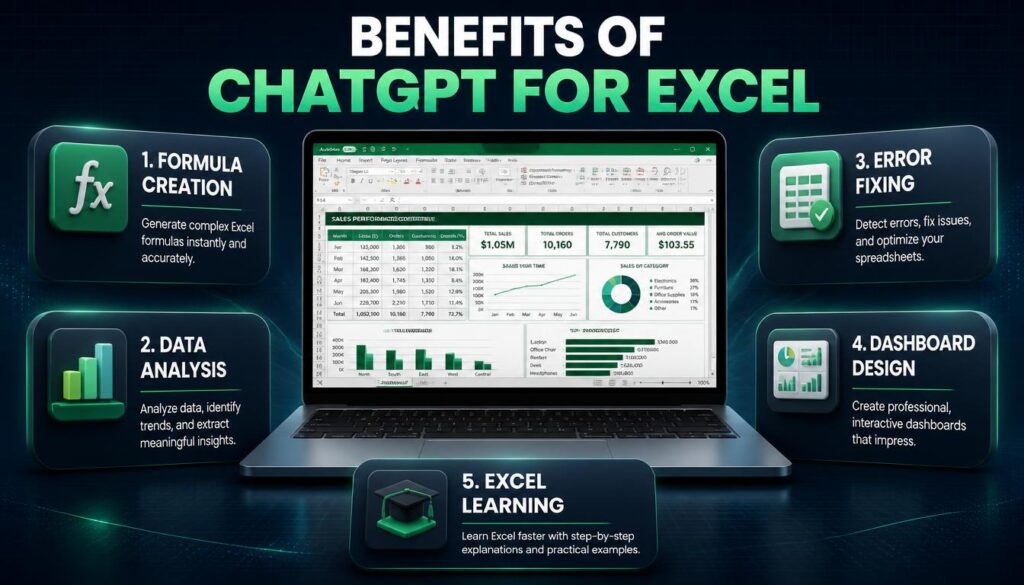
ChatGPT aapko Excel formulas generate karne, errors identify karne, data analysis samajhne aur dashboards plan karne mein help kar sakta hai.
Is guide mein hum 15 practical ChatGPT Excel prompts explore karenge, jinhe aap apne daily work, assignments aur business reporting mein use kar sakte hain.
What Are ChatGPT Prompts for Excel?
ChatGPT prompts for Excel simple instructions ya questions hote hain jo hum ChatGPT ko dete hain, taaki woh Excel-related tasks mein help kar sake.
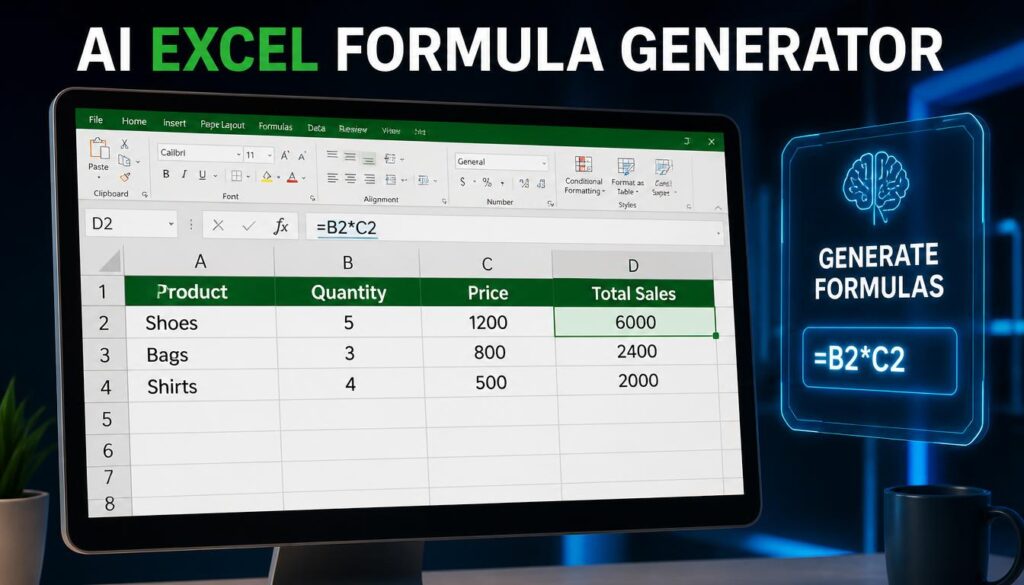
Example ke liye, agar aapko Excel mein total sales calculate karni hain, toh aap ChatGPT se appropriate formula generate karwa sakte hain.
OpenAI — Data Analysis with ChatGPT
Example Prompt:
Act as an Excel expert. Create a formula to calculate total sales by multiplying quantity in column B with product price in column C. Explain the formula step by step.
Example Output:
=B2*C2Is formula ko D2 cell mein enter karke aap quantity aur price multiply kar sakte hain. Formula ko neeche copy karne par corresponding rows ka total calculate hoga.
Why Use ChatGPT for Excel?
ChatGPT Excel beginners aur experienced users dono ke liye useful assistant ban sakta hai.
- Formula Assistance: SUM, IF, COUNTIF aur XLOOKUP jaise formulas samajhne mein help.
- Data Analysis: Sales trends, expenses aur performance reports analyze karne mein assistance.
- Error Troubleshooting: Formula errors ki possible reasons aur solutions identify karna.
- Reporting: Professional Excel reports aur dashboards plan karna.
- Learning: Complex Excel concepts ko simple explanations ke saath samajhna.
ChatGPT supported Excel aur CSV files ko analyze bhi kar sakta hai. However, file upload features aur usage limits aapke account aur available tools par depend karte hain.
15 Best ChatGPT Prompts for Excel
Yeh ready-to-use prompts students, office professionals, freelancers aur small business owners ke liye practical examples provide karte hain.
1. ChatGPT Prompt for Excel Formulas
Jab aapko kisi calculation ke liye correct formula nahi pata ho, tab yeh prompt use karein.
Act as a Microsoft Excel expert. I want to calculate total sales using quantity in column B and price in column C. Generate the correct Excel formula and explain how to apply it to multiple rows.
Best For: Basic calculations and formula learning.
2. ChatGPT Prompt for Data Analysis
Act as a professional Excel data analyst. Analyze my sales dataset containing Date, Product, Revenue, and Region. Identify top-performing products, monthly sales trends, and important business insights. Do not invent missing data.
Best For: Business reporting and sales analysis.
3. ChatGPT Prompt for Excel VLOOKUP
Explain how to use VLOOKUP in Excel to find an employee’s department using their employee ID. Provide a sample table, formula, and beginner-friendly explanation.
Best For: Employee records and database matching.
4. ChatGPT Prompt for XLOOKUP
Create an Excel XLOOKUP formula to find a product price using its product ID. Product IDs are in A2:A100 and prices are in C2:C100. The lookup ID is in E2. Return “Not Found” if no match exists.
Example Formula:
=XLOOKUP(E2,A2:A100,C2:C100,"Not Found")XLOOKUP is available in supported modern Excel versions, but it is not available as a native function in Excel 2016 or Excel 2019.

5. ChatGPT Prompt for Excel IF Formula
Create an Excel IF formula that displays “Pass” when a student’s marks in B2 are 33 or higher, otherwise displays “Fail”. Explain the formula in simple Hinglish.
Example Formula:
=IF(B2>=33,"Pass","Fail")6. ChatGPT Prompt for Duplicate Data Removal
Act as an Excel data cleaning expert. Explain how to identify duplicate customer records using Customer ID and remove unwanted duplicates safely without losing important information.
Best For: Customer databases and data cleaning.
7. ChatGPT Prompt for Excel Charts
Act as a data visualization expert. I have monthly sales data in Excel. Recommend the most suitable chart for showing sales trends and explain how to create it step by step.
Best For: Presentations, assignments and management reports.
8. ChatGPT Prompt for Pivot Tables
Teach me how to create an Excel PivotTable using a dataset containing Product, Category, Region, and Sales Amount. Show how to calculate total sales by region and category.
Best For: Summarizing large datasets.
9. ChatGPT Prompt for Excel Dashboard
Act as an Excel dashboard designer. Help me create a professional sales dashboard with total revenue, monthly trends, top products, and region-wise performance. Suggest useful KPIs, charts, and dashboard layout.
Best For: Business intelligence and reporting.
10. ChatGPT Prompt for Expense Tracking
Create a beginner-friendly monthly expense tracker in Excel for an Indian student. Include Date, Category, Description, Amount in INR, and Payment Method. Suggest formulas for total expenses and category-wise spending.
Best For: Personal budgeting and money management.
11. ChatGPT Prompt for Attendance Sheets
Help me create an Excel student attendance sheet containing student names, dates, present days, absent days, and attendance percentage. Generate appropriate formulas and explain them.
Best For: Schools, coaching institutes and colleges.
12. ChatGPT Prompt for Excel Error Fixing
Act as an Excel troubleshooting expert. My formula is showing a #VALUE! error. Explain possible causes, ask for my formula if needed, and suggest solutions without changing unrelated calculations.
Best For: Formula debugging.
13. ChatGPT Prompt for Conditional Formatting
Explain how to use conditional formatting in Excel to highlight sales values below ₹10,000 in red and values above ₹50,000 in green. Provide step-by-step instructions.
Best For: Visual analysis and performance tracking.
14. ChatGPT Prompt for Excel Automation
Act as an Excel automation specialist. I prepare a monthly report using the same data structure. Suggest safe ways to automate data cleaning and report generation using Excel formulas, Power Query, or VBA. Explain which approach is best for a beginner.
Best For: Repetitive office tasks and recurring reports.
15. ChatGPT Prompt for Learning Excel
Act as my personal Microsoft Excel tutor. Create a 30-day Excel learning plan for a complete beginner. Cover basic formulas, data cleaning, lookup functions, PivotTables, charts, and dashboards. Include daily practical exercises.
Best For: Students and job seekers preparing for Excel-related work.
Google Search Central — Helpful Content Guidelines
How to Use ChatGPT for Excel: Step-by-Step
- Open ChatGPT: Start a conversation in ChatGPT.
- Explain Your Task: Clearly describe what you want to calculate, analyze or create.
- Provide Column Details: Mention your Excel column names and relevant cell ranges.
- Request a Formula or Method: Ask ChatGPT to provide the correct formula with an explanation.
- Test in Excel: Apply the formula to sample data and check the result.
- Improve the Prompt: If the output needs changes, provide additional details.
For data analysis, you can upload a supported spreadsheet if file uploads are available in your account. Avoid uploading passwords, private financial records or confidential business data without appropriate authorization and safeguards.
ChatGPT vs Traditional Excel Workflows
| Task | Traditional Approach | ChatGPT-Assisted Approach |
|---|---|---|
| Formula Creation | Manually find and write formulas | Generate suggested formulas from instructions |
| Data Analysis | Build calculations and summaries manually | Get assistance interpreting uploaded data |
| Error Fixing | Investigate formulas independently | Receive troubleshooting suggestions |
| Dashboard Planning | Choose KPIs and charts manually | Get dashboard design recommendations |
| Excel Learning | Follow tutorials and documentation | Ask interactive follow-up questions |
ChatGPT assistance does not eliminate the need for Excel knowledge. Important formulas, calculations and analysis results should always be verified.
Expert Tips for Better Excel Prompts
Acha Excel prompt likhne ke liye sirf task mention karna enough nahi hai. Context provide karna bhi important hai.
- Mention karein ki aap Excel beginner hain ya advanced user.
- Column names aur cell ranges clearly explain karein.
- Expected output ka example provide karein.
- Excel version mention karein, especially advanced formulas ke liye.
- Complex formulas ka step-by-step explanation maangein.
- Financial ya business calculations ko sample data se verify karein.
Common Mistakes to Avoid
1. Incomplete Prompts: Sirf “Create Excel formula” likhne se useful answer milna difficult ho sakta hai. Exact requirement explain karein.
2. Blindly Copying Formulas: AI-generated formulas incorrect references ya assumptions contain kar sakte hain. Results verify karna zaroori hai.
3. Ignoring Excel Versions: Har Excel function older versions mein available nahi hota.
4. Sharing Sensitive Data: Confidential information upload karne se pehle privacy aur workplace policies check karein.
Frequently Asked Questions
1. Can ChatGPT create Excel formulas?
Yes. ChatGPT SUM, IF, COUNTIF, SUMIFS, XLOOKUP aur many other Excel formulas suggest aur explain kar sakta hai. Generated formulas ko test karna important hai.
2. Is ChatGPT useful for Excel beginners?
Yes. Beginners ChatGPT se formulas, formatting, charts, PivotTables aur spreadsheet concepts step by step seekh sakte hain.
3. Can ChatGPT analyze Excel files?
Yes. Supported ChatGPT data-analysis features Excel aur CSV files ko analyze kar sakte hain. Availability account settings aur usage limits par depend karti hai.
4. Can ChatGPT create Excel dashboards?
ChatGPT dashboard layouts, KPIs, formulas aur chart selections suggest kar sakta hai. Supported file-generation tools ke saath editable spreadsheets bhi create ki ja sakti hain.
5. Can ChatGPT automate Excel tasks?
ChatGPT Power Query steps, formulas aur VBA code suggest kar sakta hai. Automation ko real business data par use karne se pehle safely test karein.
6. Is ChatGPT better than Microsoft Excel?
Dono different purposes serve karte hain. Excel spreadsheet calculations aur data management ke liye dedicated application hai, jabki ChatGPT instructions, explanations aur analysis assistance provide karta hai.
7. Can students use ChatGPT to learn Excel?
Yes. Students formulas samajhne, practice exercises create karne aur Excel assignments ke concepts learn karne ke liye ChatGPT use kar sakte hain.
Conclusion
ChatGPT prompts for Excel students, professionals aur beginners ke liye spreadsheet tasks ko samajhne aur complete karne ka useful way provide karte hain.
Chahe aapko Excel formulas banana ho, sales data analyze karna ho, charts create karne hon ya dashboards plan karne hon, clear prompts better results paane mein help kar sakte hain.
Shuruaat basic formulas se karein, phir PivotTables, data analysis aur automation jaise advanced topics explore karein.
Next Step: Upar diye gaye 15 prompts mein se apni requirement ke according ek prompt copy karein, sample Excel data par test karein aur apni spreadsheet skills improve karna start karein.